

tufu on Squarespace sites
An AI chatbot and live chat for your Squarespace site.
It answers your visitors' questions from your own pages, day and night, and links the page it used. When someone asks for a person, you reply live from your phone or inbox.
- Works with Squarespace Code Injection
- Free plan: 100 answers a month, no card
- Live in about ten minutes
Free US$0 · Starter US$19 · Team US$49 · Scale US$249 a month. One price for the whole team. No seats, ever.
 Studio Help
What it does
Your Squarespace site, answering for you.
- The questions you answer every week, answered. What's included, what it costs, how to book: the bot answers from your services, prices, FAQ and blog, and links the page each answer came from. It finds them through the sitemap Squarespace generates at yourdomain.com/sitemap.xml.
- Live chat when a visitor wants you. Talk to a human sits under every answer. Press it and the bot pauses, your team gets pinged, and whoever picks it up replies live from the tufu inbox, by email, or from Slack on Team.
- One paste covers every page. Squarespace injects Header code into the <head> of every page and Footer code before the closing </body> tag, so the chat button follows visitors from your home page to your contact page.
- Checkout is left alone. Squarespace's checkout pages don't support code, so the chat shows on your product and content pages and stays out of payment.
- It keeps up with your edits. Squarespace updates the sitemap by itself when you add or remove content, usually within an hour and sometimes up to a day later. Then press Re-read on the source in tufu, or let a paid tufu plan re-read it on a schedule.
Set up
Three steps, about ten minutes.
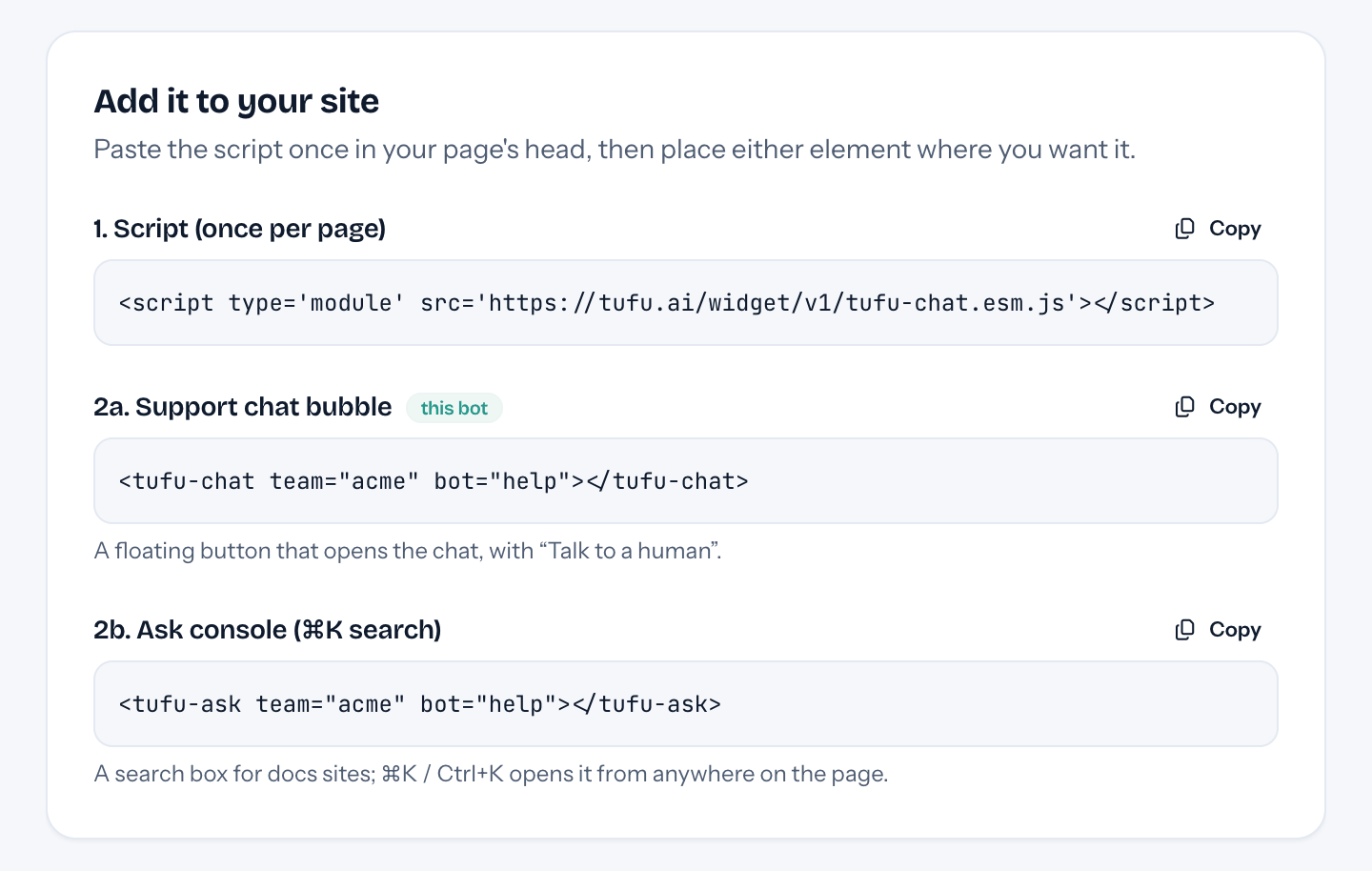
- 01In tufu, make your bot and add your site's address as knowledge. Then open Put it on your site and pick the Squarespace tab: both snippets wait there with your team and bot filled in.
- 02In Squarespace, open the Code Injection panel. Paste the script into Header and the chat element into Footer, then click Save.
- 03Open your site's address in a private window, where your code always runs: Squarespace can switch scripts off in the preview you see while logged in. The chat button is in the corner.
Plans
What it costs.
tufu's Free plan costs nothing: 1 bot, 100 answers a month and handoff to your inbox and email, with a small “Powered by tufu” link under the chat. Team is $49 a month for everyone on your team and adds routing and a daily re-read of your site. Your Squarespace subscription is separate and billed by Squarespace.
See pricingQuestions
Before you start.
Which Squarespace plan do I need?
One that includes code injection. Squarespace lists it in the Core, Plus and Advanced plans and in some legacy billing plans.
Can I set it up on a trial site?
Not fully. Squarespace has no sitemap for trial sites, and a private or password-protected site doesn't load one, so tufu can't read your pages yet. Upload files or write answers in tufu until the site is public.
Will a chatbot slow my Squarespace site down?
The script is one small module that browsers run after they have read your page, and the chat itself loads only when a visitor opens it.
Can I talk to visitors myself?
Yes. Take over any conversation from the inbox, or wait for a visitor to press Talk to a human. You are pinged only when someone needs a person.
Does it work on mobile?
Yes. On a phone the chat opens as a full-screen sheet instead of a panel in the corner.
What does it cost?
Nothing to start: Free has no time limit and asks for no card. Paid plans are flat, with no seats.

Set it up before your next support email.
Free to start, no card needed. Point it at your site and it's answering in about ten minutes.
tufu is not affiliated with or endorsed by Squarespace. Squarespace is a trademark of its owner.