

tufu on Shopify stores
An AI support chat for your Shopify store, without an app.
Paste two lines into your theme once. The bot answers from your products, collections and policies, and anything about one customer's order goes to a person.
- No app to install, no App Store billing
- Works on the Free plan
- Order questions go to you, not a guess
Free US$0 · Starter US$19 · Team US$49 · Scale US$249 a month. One price for the whole team. No seats, ever.
 Shop Help
What it does
Made for the way a Shopify store works.
- It reads your catalog from your sitemap. Every Shopify store publishes /sitemap.xml with its products, collections, pages and blog posts. Add it as a Website source in tufu and the bot can answer about what you sell.
- Add your policies by address. The sitemap doesn't list your store policies, so add /policies/shipping-policy, /policies/refund-policy and /policies/terms-of-service as a second source, one per line.
- It doesn't pretend to see orders. tufu doesn't connect to your Shopify admin. A question about a specific order goes to a person: the customer presses Talk to a human, or the bot hands the chat to you.
- New products, new answers. Press Rebuild on the source after you add products or change prices. On Team, tick Refresh every week and tufu reads your store again on its own.
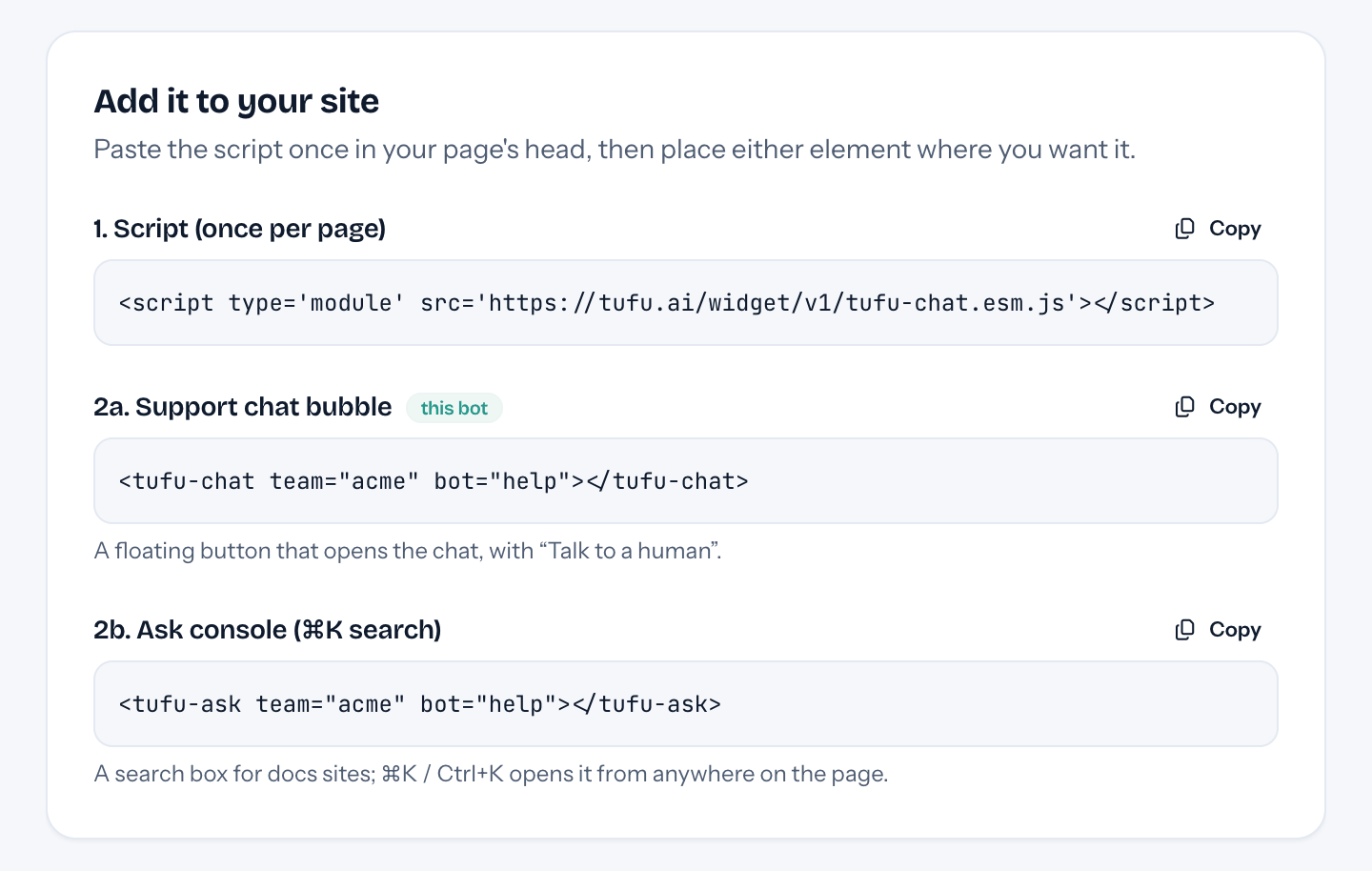
- A search box for your FAQ page. Add a Custom Liquid section to the page and paste one more line: visitors ask in plain words and get a short answer with the pages to read.
- On your store, not in checkout. theme.liquid is the layout of your storefront's pages, so the chat shows on product, collection and content pages. Shopify's checkout keeps its own layout.
Set up
Three steps in your Shopify admin.
- 01Go to Online Store → Themes, open the … menu next to your current theme and choose Edit code. Shopify suggests duplicating the theme first, as a backup.
- 02Under Layout, open theme.liquid. Paste the script just before </head> and the chat just before </body>, then press Save. Copy both from your bot's Put it on your site page in tufu.
- 03In tufu, add your store's sitemap under Knowledge, on your own domain rather than the .myshopify.com address. The bubble is already on every page.
Plans
What it costs.
It works on Free: 1 bot, 100 answers a month and handoff to your inbox and email, with a small “Powered by tufu” link. Team, $49 a month for the whole team, adds the weekly refresh, removes the link, and brings handoffs to Slack.
See pricingQuestions
Before you start.
Is this a Shopify app?
No. Nothing to install from the Shopify App Store and nothing billed through Shopify: two lines in your theme, and you pay tufu directly if you upgrade.
Who can paste the code?
The store owner, or staff with the Themes and Edit code permissions. Shopify doesn't let you edit the code of a theme you're still trying out, and the Starter plan offers no theme customization.
What happens when I update my theme?
Shopify carries your code edits into an update unless they clash with it, and tells you if they couldn't be included. If you switch to another theme, paste the two lines into that one.
My store is still password-protected.
Then nothing outside can read its sitemap, tufu included. Add your knowledge once the store is open, or point tufu at your help pages elsewhere.
More places tufu works

Set it up before your next support email.
Free to start, no card needed. Point it at your site and it's answering in about ten minutes.
tufu is not affiliated with or endorsed by Shopify. Shopify is a trademark of its owner.